The PDF workspace, reconsidered.

Space to read.
Tools to do more.

Make sense of a long read. Mark up an idea. Finish the form.
All in one thoughtful place.

The complete reader is free. Always.

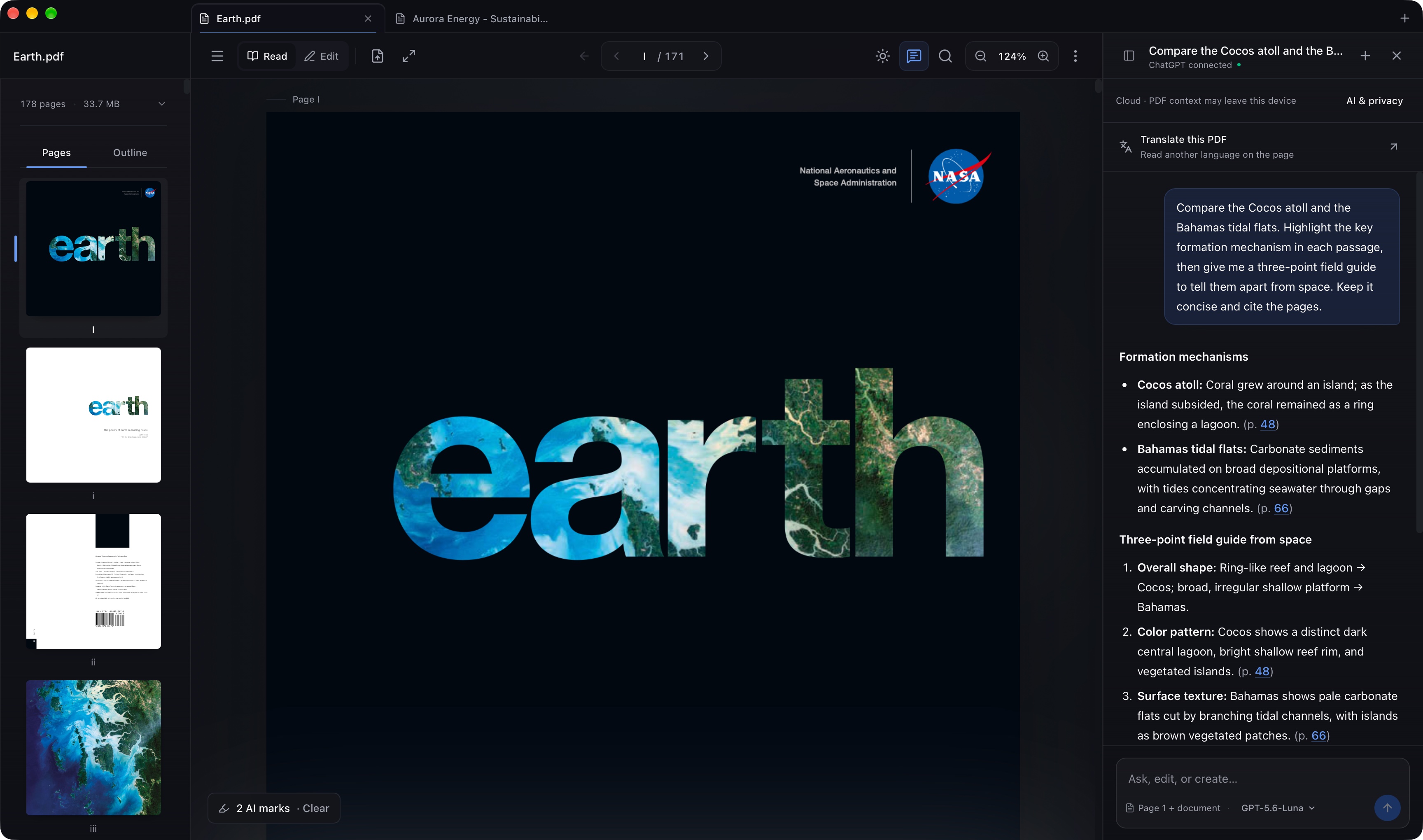
Readlet on Mac displaying a satellite photograph of the Cocos Islands, with page thumbnails and a ChatGPT-connected agent comparing island formations across the book
Settle into a good read Make it your own Go a little further

A good read.
Down to the last detail.

Ambient Mode

A little colour from the page, carried into your workspace. Let the document set the mood.

Focus Mode

Give the page your full attention. Bring the tools back when you need them.

1 / 5

Smart Search

Find exactly what you're looking for, even in scanned documents. Built-in OCR happens locally.

invoice total
p.3 ...the invoice total is $2,450...
p.7 ...previous invoice total amount...

Local by default

Reading, search, editing, forms, and signatures stay on your device. AI is optional and only runs when you ask.

Light & Dark

A clear light theme for the day. A comfortable dark theme when the room gets dim.

Every tool works two ways.
Yours and the agent’s.

This isn’t a chat window bolted to the side of your document. The agent uses the tools already in Readlet: the highlighter, form fields, page organiser and exporter. If you can do it yourself, you can ask Readlet to do it with you.

Every request lands as one undoable step, even when it changes several things at once.

Explore Readlet Plus
Marking up
Highlight, underline or strike through the passages you name.
Filling a form
Complete fields from your saved details, add text boxes, place your signature.
Organising pages
Rotate, reorder, duplicate, delete, or insert a blank page.
Exporting what matters
Extract the pages you need, export one as an image, or pull out the text.
Making sense of it
Answer from the document, citing the page. Translate what’s in front of you.

Every one of these is a tool in the toolbar too. You can do it yourself, or say what you want done.

Bring your ChatGPT.

Connect the ChatGPT account you already use, whether you’re on Free, Plus or Pro. Put it to work on your documents without a separate API key.

Built into the Mac and Windows apps. Chrome needs a one-time Companion install. Your plan’s availability and usage limits apply.

Keep it on your Mac.

Choose a supported open-source model and run it on your Mac. Download it once, then work offline with your document context staying on your device.

On-device Qwen models are available on compatible Macs. Capabilities vary by model and available memory.

Readlet AI is part of Readlet Plus. Your ChatGPT plan is separate.

Finish the document.

Type, draw, fill forms, and place a saved signature without leaving the reader. Every object stays adjustable until it feels exactly right.

  • Resizable text fields, including automatically detected ones
  • Ink tuned for mouse, trackpad, pen, and touch
  • Export a finished PDF or preserve a clean original
  • Basic annotations, forms and typed or drawn signatures are free

A different language.
The same train of thought.

Translate the pages you need and read them in place. Keep a translated PDF when you are done, or return to the original at any time.

  • Move between the original and translated view
  • Keep a translated copy for reading and printing
  • You choose when to use AI and which provider to use
Field notesTranslation example
01 / Observations

A slower way
to see the world.

Walk the same path twice. The light will have changed, and so will the things you notice.

1

An illustrated preview. Actual translations use your selected AI provider.

Room for more than one PDF.

Keep documents in tabs, move between them, and pick up where you left off. On Mac and Windows, pull a tab into its own window.

The pages you need. In order.

Combine PDFs, rearrange pages, rotate a scan, or extract just the useful part. Export a page as an image, too.

Some things should stay private.

Mark sensitive areas for permanent redaction. Export a fresh, image-only PDF with that content removed, and keep your original separately.

Continue reading Recent files reopen on the page you left.
On-device AI on Mac Download a supported local model, then use it offline.
Keep control of your edits Adjust annotations and undo changes as you work.
Your information vault Reuse form answers and saved signatures locally.

Your documents. Your choice.

Reading, OCR and everyday editing happen on your device. Cloud AI sends the selected document context to the provider you choose. You can leave AI off, including for individual PDFs.

AI setup and available models vary by platform. Chrome’s ChatGPT connection uses Companion; the Mac and Windows apps have it built in.

How privacy works

Polished in the details.

Smooth at any scale

Trackpad, mouse, touch, and pen gestures stay anchored to the content beneath you, even through fast zooming and long pages.

Page-by-page control

Rotate, duplicate, remove, reorder, or export an individual page without disturbing the original document.

Search without waiting

Results appear progressively, group themselves by page, and stay keyboard-navigable while local OCR handles scanned text.

Comfortable in every theme

Choose light or dark, then let Ambient Mode borrow subtle colour from the page when you want the document to set the atmosphere.

Free to read.
More when you need it.

The reader is a complete product. Plus is for the work that asks a little more of it: AI, adding text, translation and advanced signature capture.

Explore it in Readlet
Readlet+

US$9.99 once

Pay once. Keep Readlet Plus.
No subscription.

Try it for 60 days, without a card.
Your trial starts when you choose a Plus tool.

Reading, annotations, ordinary forms, basic signatures and page tools stay free. Your work stays yours when the trial ends.

A place for your PDFs.
On your desktop.

Choose your computer. Get the latest available Readlet.

Beta

Readlet for Mac

Apple silicon · macOS 14 or later

A dedicated Mac app, with native document tabs and windows.

Mac download coming soon

The public Mac release is being prepared.

Beta

Readlet for Windows

Windows 10 or later · x64

A focused Windows app with document tabs and the tools close at hand.

Windows download coming soon

The public Windows release is being prepared.

The desktop apps are in beta. Some features are still being refined, and availability varies by platform.

Desktop downloads appear here when the public releases are ready.

Open in your browser Add to Chrome iPad and Android tablet editions are on the way.
How will updates work?

The desktop apps include an updater. Once public releases are available, Readlet checks for new versions and downloads signed updates. Windows waits until your document tabs are closed before installing on quit; Mac uses its built-in update flow. You can also check manually. Older Mac builds without the updater need a one-time reinstall.

Can I use Readlet offline?

Yes. Reading, search, local OCR, annotations and ordinary document work do not need a server. Windows may download Microsoft WebView2 during first installation. Cloud AI, downloads and update checks need a connection.

Is everything available on every platform?

The core reader is shared. Native window behaviour and local-model options vary by platform, and tablet releases are not available yet. The Mac download targets Apple silicon.